
Creative Studio · AI creatives
Professional ad creatives
in minutes
Pick a template, add your copy, and the AI renders on-brand ad images with backgrounds and text overlays, ready to download for Meta and Google.
Templates built for ads
Before/after, benefits, review, and simple layouts. Pick the angle, the structure is already right.
AI backgrounds and overlays
The AI renders the background and lays your headline, body, and CTA over it. No layers, no design software.
On brand by default
Your logo, colors, and product photos go into every image, so creatives look like you made them.
Template library
Four styles, one brand
Every template starts from your brand assets: logo, colors, and product images.

Simple
Background, headline, body, CTA. Clean and versatile for any campaign.

Benefits
Split layout pairing your product image with short benefit bullets.

Review
A customer quote and star rating over a lifestyle background.
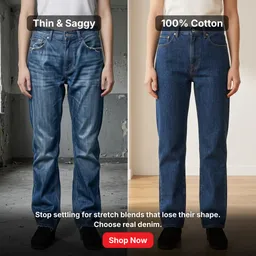
Before/After
Side-by-side transformation for results-driven campaigns.
Actual images generated in Creative Studio
How it works
From copy to creative
Three steps from an idea to a finished ad image.
01
Pick a template and copy
Choose a layout style, then pull headlines from the Copywriter tool or paste your own.
02
Add your brand
Point it at your brand kit: logo, colors, and the product photos you want featured.
03
Generate and download
The AI renders variants with backgrounds and text overlays. Download the ones you like and publish when you are ready.
Before you start
Frequently asked questions

Free audit · No credit card
Your next ad is minutes away.
Bring a product photo and your brand colors. Creative Studio turns them into finished ad images that are yours to download and run.
Get started freeNo credit card required · Revoke access anytime